Picking something up on the way home
You're heading home and passing the supermarket. A quick look at the app shows what's missing at home, including what your roommate added ten minutes ago.
One list for everyone, up to date on every phone.
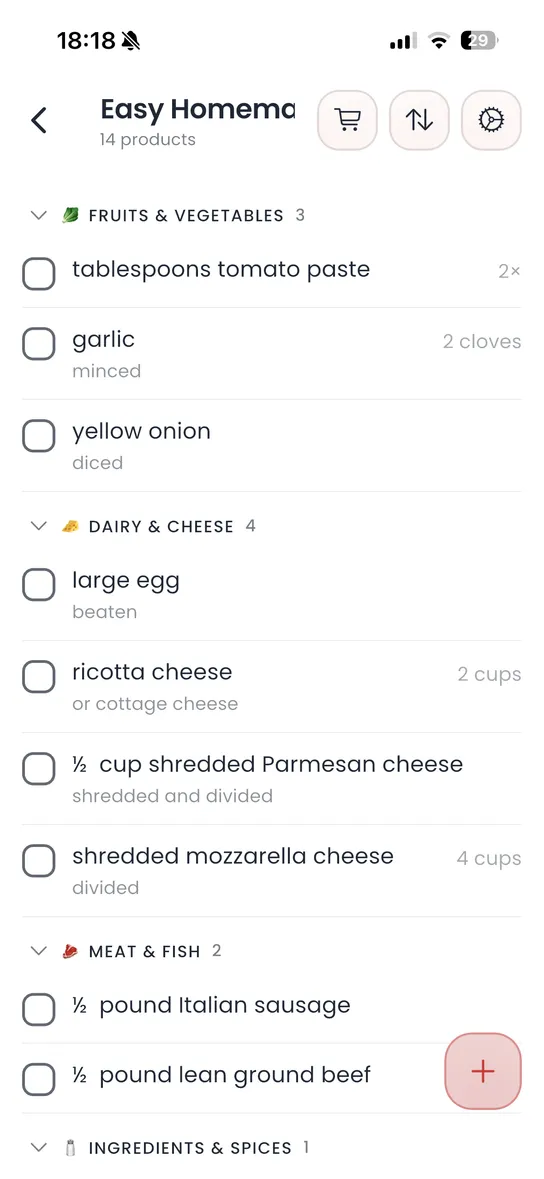
Homzie is a shopping list app that everyone in the household shares. Whoever notices the milk is gone adds it, and whoever is standing in the supermarket sees it on their phone right away.
Items get a quantity and a category, so you don't walk back to the dairy aisle twice. In shopping mode you tick off what's in the cart and the others can see what's still missing. Ingredients from the Homzie meal plan go straight onto the list.
Mostly when several people do the shopping and requests otherwise travel by group chat, shouting across the flat or sticky notes.
You're heading home and passing the supermarket. A quick look at the app shows what's missing at home, including what your roommate added ten minutes ago.
For the Saturday shop the list is sorted by category. Two people can split up in the store and see what the other already has in the cart.
All three work. The differences show once more than one person does the shopping.
| What you need | Homzie | WhatsApp group | Paper list |
|---|---|---|---|
| Everyone sees the current list | yes | yes, but scattered across the chat | only whoever is at home |
| Tick items off in the store | yes, visible to everyone | no | yes |
| Sorted by category | yes | no | only if you sort it yourself |
| Add ingredients from the meal plan | yes | no | no |
| Cost | core features free | free | free |
If the same person always does the shopping, a list on the fridge is enough. An app pays off as soon as different people shop on the go.
Download Homzie and organize your household.
Short answers about the shopping list in Homzie.
Create a household in Homzie and invite the other person with a link. After that you both see the same lists and every change.
Yes. New items, changed quantities and ticked-off purchases appear on the others' phones straight away.
Yes, for example for the weekly shop, toiletries or a party. That keeps the regular list tidy.
Yes. In a supermarket with poor reception you can still tick items off. Changes sync once you're back online.
Yes. When you link recipes to your meal plan in Homzie, you can add their ingredients straight to the shopping list.